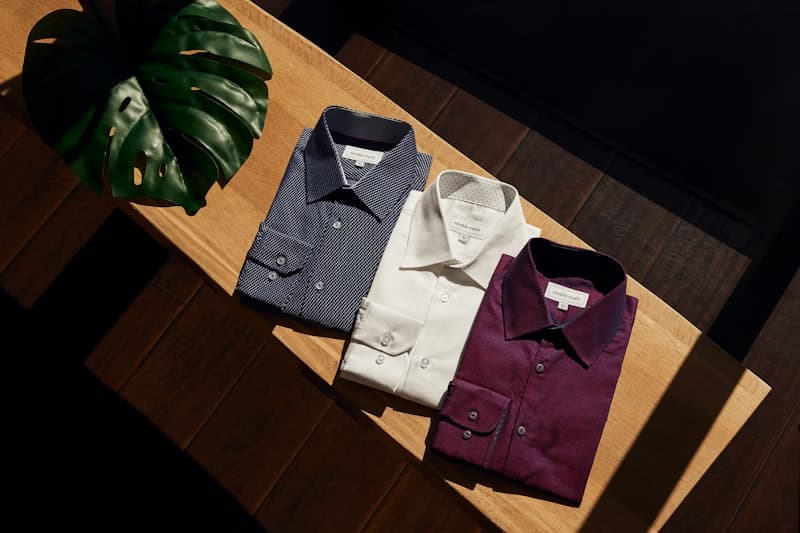
Clothing Photography Best Practices for Online Stores: Sell More with Better Images
Master clothing photography with lighting setups, styling tips, and editing workflows that showcase products and boost conversion rates.
Introduction
In ecommerce, your product photos are your storefront. Customers can't touch, try on, or feel your clothing — they can only see it. The quality of your product photography directly determines whether a browser becomes a buyer.
Clothing photography is uniquely challenging. Fabric texture, color accuracy, fit perception, and drape are all communicated through two-dimensional images. Get the photography right, and customers trust what they see. Get it wrong, and returns skyrocket.
This guide covers everything a solopreneur needs to create professional-looking clothing photos: lighting setups, camera gear on a budget, styling best practices, and post-production workflows.
The Impact of Good Product Photography
Conversion Rate Lift
Studies consistently show that high-quality product images improve conversion rates by 30-50% compared to poor or mediocre images. For apparel specifically, the impact is even higher because customers need to visualize how the garment will look on their body.
Return Rate Reduction
Poor photography is the #2 cause of apparel returns (after sizing). When customers receive a product that looks different from the photos — the color is off, the fabric looks cheaper, the fit appears different — they return it. Accurate, comprehensive photography directly reduces returns.
Brand Perception
Your product photos are your brand. A store with professional photos signals quality, trustworthiness, and attention to detail. A store with amateur photos signals the opposite.
Essential Gear for Clothing Photography
Budget Setup (Under $500)
- Camera: A recent smartphone (iPhone 12+ or equivalent Android) with a good camera mode. Use the main lens, not the wide-angle.
- Lighting: Two softbox lights (Godox SK300 or Neewer 18-inch LED panels) — $100-150
- Backdrop: Seamless paper in white or light gray — $30 for a roll
- Tripod: Essential for consistency between shots — $40
- Mannequin or dress form: Adjustable mannequin for flat lay consistency — $80-120
Mid-Range Setup ($500-$2,000)
- Camera: Sony A6100 or Canon EOS M50 with a 50mm lens — $600-800
- Lighting: Two studio strobes with softboxes — $300-500
- Backdrop stand and paper: Multiple colors — $100
- Wireless trigger for flash sync — $50
- Steamer: For wrinkle-free clothing — $30
Pro Setup ($2,000+)
- Camera: Full-frame DSLR or mirrorless (Sony A7 III, Canon EOS R) — $1,500-2,000
- Lens: 50mm f/1.8 or 85mm f/1.8 for portraits — $200-600
- Lighting: Profoto or Broncolor studio strobes — $1,000+
- Tethering station: Shoot directly to computer for instant review
Lighting for Clothing Photography
The Foundation: Soft, Even Light
The goal is to eliminate harsh shadows while maintaining fabric texture. Softboxes or diffused strobes are essential.
Two-light setup (standard):
- Key light at 45 degrees to the subject, slightly above
- Fill light at the opposite 45 degrees, at 50% power relative to key
Three-light setup (for depth):
- Key and fill as above
- Back light (hair light) from behind at 45 degrees to separate the garment from the background
Avoiding Common Lighting Mistakes
- Harsh shadows: Use larger diffusers or move lights closer
- Hot spots: Check that highlights on shiny fabrics (silk, satin) are controlled
- Color casts: Use daylight-balanced lights (5500K) and ensure consistent color temperature
Flat Lay Lighting
For flat lay (garments arranged on a surface):
- Overhead lighting at 45 degrees from both sides
- Or a single large diffuser directly overhead
- Reflectors on the shadow side to fill
Styling Your Clothing
On-Model Photography
Model photography is the most effective for conversion because it shows how the garment moves, drapes, and fits.
Best practices:
- Use models that match your target customer's body type and demographic
- Show multiple poses: front, back, side at 45 degrees, and a detail close-up
- Capture movement — a walking shot shows fabric drape
- Include lifestyle shots (wearing the garment in a relevant setting)
Flat Lay Photography
Flat lay is faster and cheaper than model photography and allows for clean, detailed shots.
Best practices:
- Arrange the garment neatly — symmetrical for structured items, natural for casual items
- Show layers (styling with complementary pieces)
- Use consistent folding and positioning across similar products
- Consider adding accessories (bags, shoes, jewelry) for context
Mannequin Photography
A mannequin or dress form bridges the gap between flat lay and live model — it shows fit without needing a human model.
Best practices:
- Ensure the mannequin is the correct size for the garment
- Pin the garment to fit naturally (excess fabric can look unflattering)
- Use an invisible mannequin (body form wrapped in garment) for a "floating" look
Color Accuracy
Color is the #1 source of "product looks different" returns. Getting color right requires:
1. Calibrated Monitors
Calibrate your editing monitor with a device like SpyderX or Datacolor. What you see on an uncalibrated screen is almost certainly inaccurate.
2. Gray Balance Cards
Include a gray card in your first shot of each lighting setup. This gives your editor a reference point for white balance correction.
3. Consistent Lighting
Natural light changes throughout the day. Studio strobes provide consistent color temperature across all shots. If using natural light, shoot in the same location at the same time.
4. Color Swatches
Include a fabric swatch photo in the gallery. "Screen colors may vary" is a cop-out. Show the actual fabric alongside a reference object (like a Pantone chip) for absolute accuracy.
Editing Your Photos
Basic Editing Workflow
- White balance correction: Use the gray card reference
- Exposure adjustment: Ensure the garment is properly exposed (histogram centered)
- Color correction: Adjust saturation and vibrance to match the actual product
- Background removal or color correction: White background for catalog consistency
- Sharpening: Apply moderate sharpening for fabric texture
- Batch processing: Apply the same settings across all photos in a set
Recommended Tools
- Adobe Lightroom: Industry standard for batch editing with presets
- Capture One: Superior color handling, preferred for fashion
- Canva: Quick edits and background removal for solopreneurs
- Remove.bg or Adobe Photoshop: For background removal
- Luminar Neo: AI-powered editing with one-click improvements
Retouching Best Practices
- Remove wrinkles and creases (using Clone Stamp or Content-Aware Fill)
- Clean up stray threads and lint
- Maintain fabric texture — don't over-smooth
- Don't alter the garment's actual fit (don't make it look slimmer than reality)
Building a Photo Gallery
Required Shots Per Product
For optimal conversion, include:
- Front view (full garment, straight on) — required
- Back view — required
- Side view (45 degrees) — strongly recommended
- Detail close-up (fabric texture, buttons, stitching) — recommended
- On-model or on-mannequin front — strongly recommended
- On-model back — recommended
- Lifestyle shot (in context) — recommended
- Packaging shot (what the customer receives) — nice-to-have
- Size reference (model with measurements, or alongside a common object) — nice-to-have
Image Specifications
- Resolution: 2000-4000 pixels on the longest side
- File format: JPEG at quality 80-90 (balance between quality and load speed)
- File size: Under 500KB per image for fast loading
- Background: White (#FFFFFF) for standard catalog, lifestyle for variety
- Consistency: Same aspect ratio, same styling, same lighting across all products
DIY vs. Professional Photography
When to DIY
- You have fewer than 50 SKUs
- Your budget is under $1,000
- You have decent lighting equipment and some photography knowledge
- Your products don't require complex styling
When to Hire a Professional
- You have 50+ SKUs to shoot
- Your budget allows $100-300 per product for photography
- You need "wow factor" lifestyle for hero images
- You're launching a premium brand
- Your products require specific technical photography (e.g., technical gear, lingerie)
FAQ
Q: Can I use AI-generated product photos instead of real photography? A: AI-generated product photos work for mockups and concept testing, but real photography is essential for accuracy and trust. Customers want to see the actual product.
Q: What's the minimum number of photos per product? A: 3: front view, back view, and a detail shot. For best results: 5-8 photos including on-model and lifestyle shots.
Q: Should I use a white background or lifestyle setting? A: White backgrounds are essential for catalog consistency (Amazon, Google Shopping require them). Add lifestyle shots for variety and emotional appeal.
Q: How do I photograph dark clothing? A: Dark clothing requires extra light to show detail. Increase exposure by 1-2 stops and use edge lighting (backlight) to define the silhouette.
Q: How often should I update product photos? A: Update anytime the product changes (new colors, new materials, new packaging). Refreshing old photos of existing products can also boost sales by 10-30%.
Summary
Professional clothing photography is one of the highest-ROI investments an ecommerce solopreneur can make. By investing in basic lighting gear, mastering soft and even light, using consistent styling and color calibration, and providing multiple views per product, you can significantly improve conversion rates and reduce returns. Start with the essential shots (front, back, detail) on a white background, add lifestyle shots as your budget allows, and always prioritize color accuracy above all else.